
TL;DR: An Apple Wallet loyalty card is a stamp or points card your customers save to their iPhone in two taps, straight from a QR code or a link. There’s no app to download, which removes the step that stops most people joining a loyalty program. Android customers get the same card in Google Wallet. Your team scans it at the counter, customers see their progress any time, and you can send messages to their lock screen.
Ask a customer to download your loyalty app and you’ll usually get a polite smile and a “maybe next time.” An Apple Wallet loyalty card skips that moment. The card saves straight to the phone your customer already carries, in the same place they keep boarding passes, tickets and the cards they pay with.
It’s a small change that fixes a big problem. Most people are happy to collect stamps at their favourite café or salon. What they won’t do is install another app, create another password and hand over their details just to get started. Owners talking about loyalty online put it bluntly: nobody downloads an app for their local coffee shop.
The phones are already there. Pew Research Center’s 2026 figures show 91% of US adults own a smartphone. The question isn’t whether your customers can use a digital loyalty card. It’s whether joining feels easy enough to bother.
This guide covers what an Apple Wallet loyalty card is, why it works better than an app for a small business, what your customers actually see, and why you need Google Wallet too. It’s written for cafés, salons, restaurants, gyms and any local business that runs on regulars, in Canada, the US or anywhere else.
What is an Apple Wallet loyalty card?
An Apple Wallet loyalty card is a digital stamp, points or membership card that your customer saves to the Wallet app built into every iPhone. It shows your logo, their progress and their reward. It updates when your team scans it, and it needs no separate app.
Apple calls these cards “passes.” In its guidance for businesses, Apple describes them as a good fit for customers who don’t have your app but still want to join your loyalty program. Passes can be shared with a QR code, a link in a text or email, or your website, and they update as customers earn stamps or rewards.
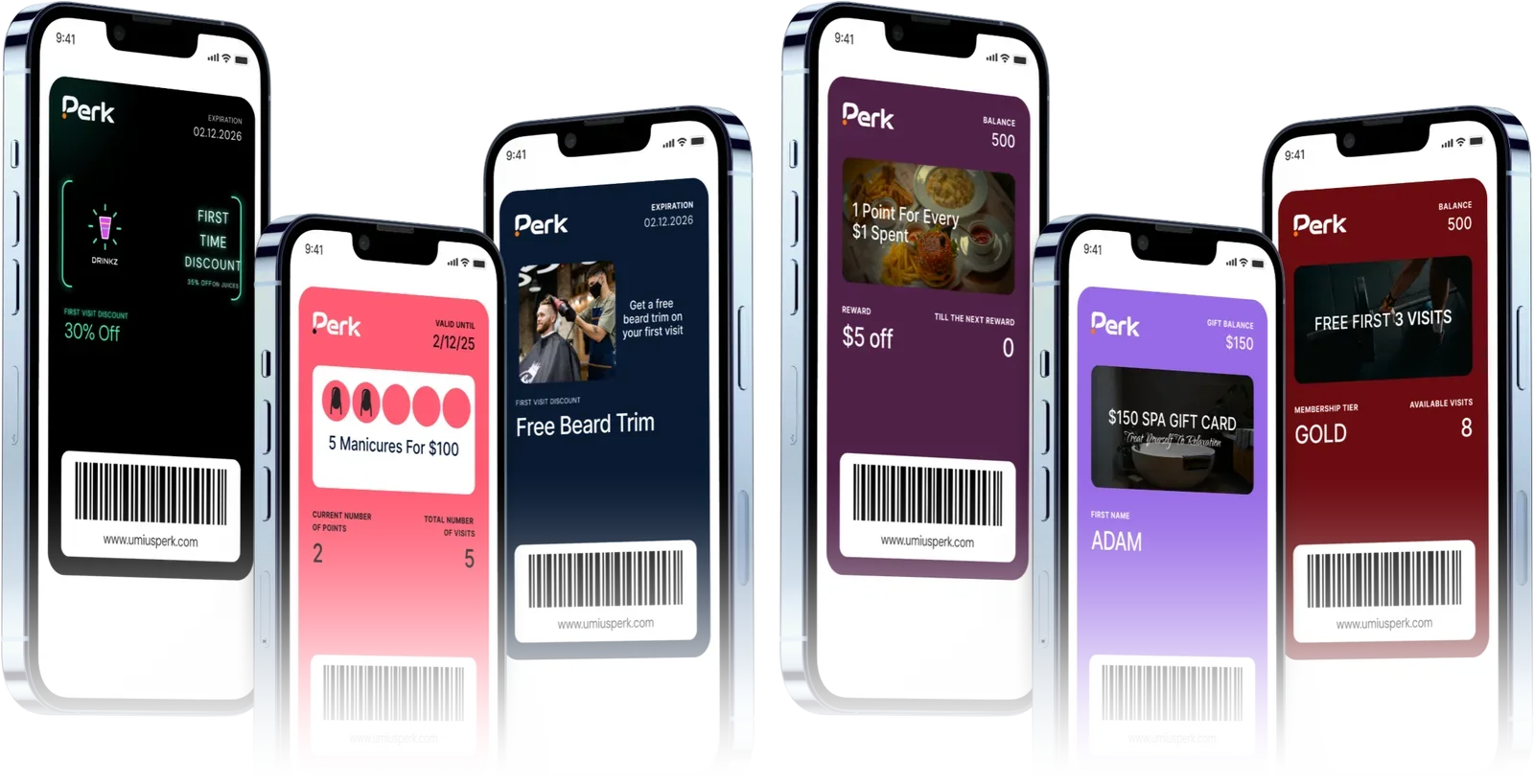
What you can put on a wallet card
A wallet card isn’t limited to stamps. With Perk, you can choose the format that matches how your customers buy:
- Stamp cards for everyday visits, like a free drink after a set number of coffees.
- Points cards when spend varies, so bigger orders earn more.
- Memberships with member-only perks for your best customers.
- Multipass cards for prepaid packs, such as a bundle of blow-dries or classes paid upfront.
- Gift cards, coupons, discounts and cashback for occasions, first visits and store credit.
How it’s different from a loyalty app
A loyalty app is a separate program your customer has to find in the app store, download, open and sign up for. A wallet card is a single card inside an app they already have. There’s nothing to install, nothing to update and no home-screen space to give up.
That difference matters most for small businesses. A big chain can talk people into downloading its app because they visit several times a week and the app also handles ordering and payment. Your café or salon is one stop among many. A card that takes two taps is a much easier ask than an app that takes two minutes.
Google Wallet works the same way
Android phones have their own version: Google Wallet. A Google Wallet loyalty card works the same way, and Google points out that customers can open the wallet, swipe up and tap the card they need instead of digging through apps. Perk gives you branded loyalty cards for Apple Wallet and Google Wallet from one program, so you never have to leave anyone out.
Why customers won’t download your loyalty app
If you’ve tried an app-based loyalty program, you may have seen this happen. A handful of keen regulars sign up. Everyone else nods, says they’ll do it later, and never does.
It isn’t that customers don’t care about rewards. It’s the effort. Downloading an app means finding it, waiting for it to install, creating an account, confirming an email and deciding about notifications. Each step is a chance to give up, usually while there’s a queue behind them.
People are tired of apps
Phones are full, and people are choosy about what they keep. In research from mobility data company Arity, 66% of consumers said they had deleted an app over privacy concerns. A loyalty app that asks for personal details on day one has to clear that hurdle before it earns a single visit.
Customers also say they’d rather not use apps to get offers at all. In Vibes’ 2026 Mobile Consumer Insights survey, only 20% preferred redeeming offers through a brand’s app, behind both text messages and email.
Wallet cards are what customers say they want
The same Vibes survey found that 75% of consumers are much more likely to engage with a brand that offers a mobile wallet loyalty card, up from 57% the year before. That’s a big jump in a single year, and it matches what many owners hear at the counter.
Owners who’ve tried different setups tend to land in the same place. The programs that work are the ones customers can join without stopping to think: scan, tap, done. When the reward is good but joining is a chore, sign-ups stay low.
How customers add an Apple Wallet loyalty card in two taps
Customers scan your QR code with their phone camera or tap a link you send them. Their phone shows a preview of your card, and they tap Add. The card saves straight to Apple Wallet on an iPhone, or Google Wallet on Android, ready for its first stamp.
- Scan or tap. Your QR code sits on the counter, on tables or on your receipts. You can also send the link by text or email.
- Add the card. The phone shows your card with your logo and reward. One tap saves it to the wallet.
- Collect the first stamp. Your team scans the card at checkout, and the first stamp lands straight away.
That’s the whole sign-up. With Perk, there’s no app for your customer to find in a store and nothing to install. On Android, customers can also save the card as a web app if they prefer.
What customers see once the card is saved
Your customers see a card with your logo and colours, the reward they’re working towards and how many stamps or points they have. It sits in their wallet next to their payment cards, and your messages can appear on their lock screen, much like a text.
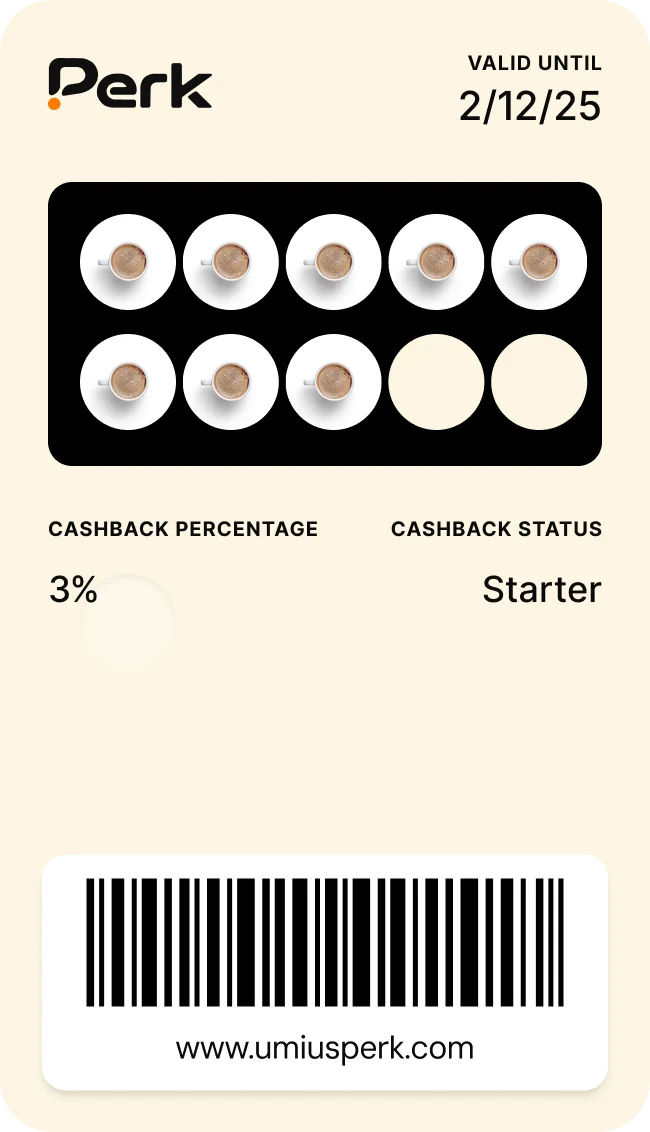
Progress they can check any time
Paper cards hide in wallets and drawers. A wallet card shows progress whenever the customer opens it, so “two more coffees until a free one” is always one glance away. That small reminder is often what brings someone back this week instead of next month.
Messages on the lock screen
Apple notes that passes can show lock screen notifications when a card updates, and that businesses can use them to share offers and program news. With Perk, you can send push messages to the lock screen for everyone, a group or a single customer.
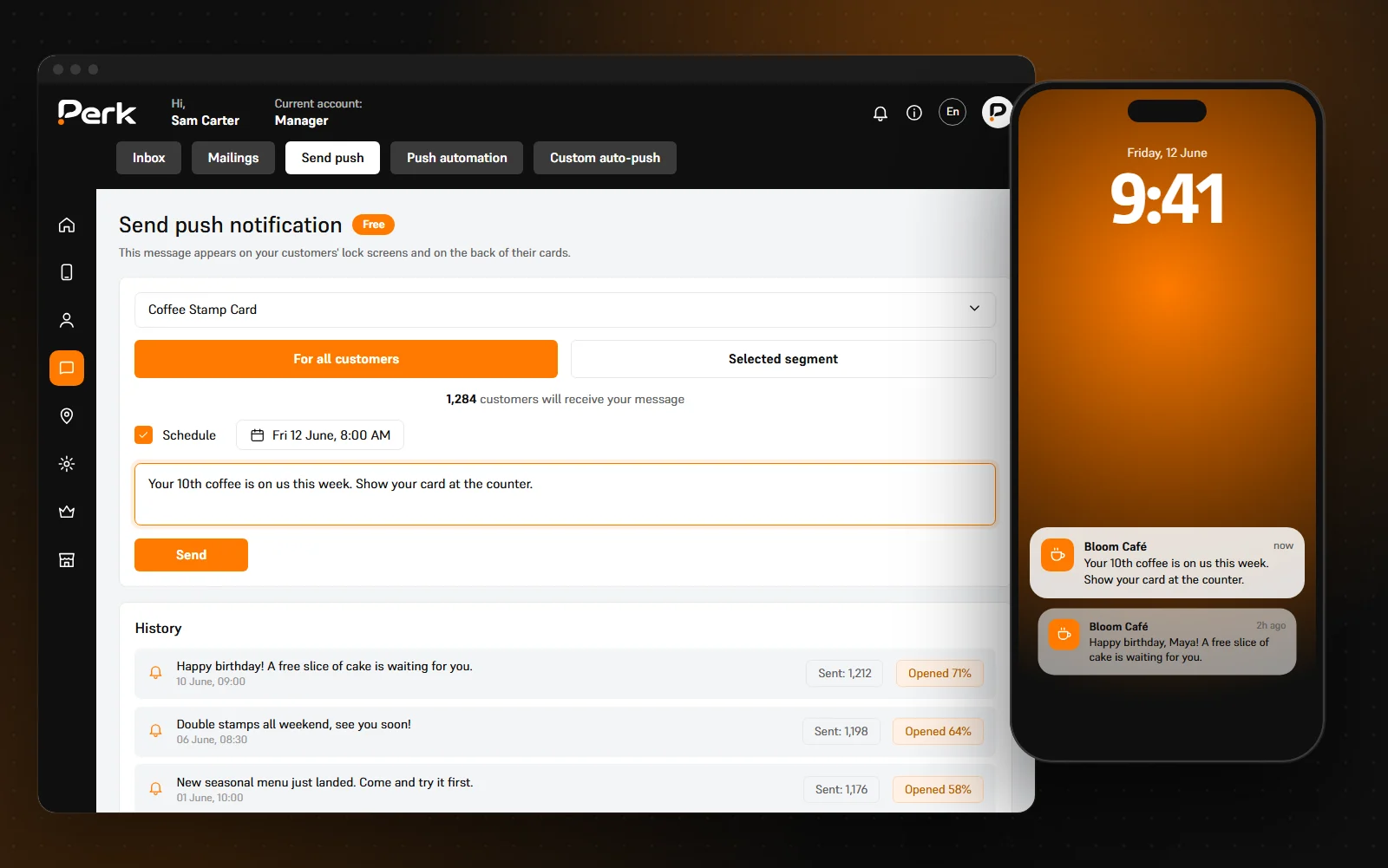
Use it sparingly. One timely note, such as a reward that’s waiting or a new seasonal drink, does more than a weekly blast. Wallet messages aren’t the same as texts or email, but if you also message customers that way, check the consent rules where you operate.
Buttons that bring them back
The back of the card can hold buttons that open your website, call you, get directions or leave a review. For salons and barbers, a booking button on the card plus rebooking reminders keeps the next appointment one tap away.
Apple Wallet vs Google Wallet loyalty cards: do you need both?
Yes. In both Canada and the US, a large share of your customers use Android phones, and a card that only works in Apple Wallet would leave them out. Choose a loyalty card that saves to Apple Wallet on iPhones and Google Wallet on Android, from the same QR code.
The split varies by country. StatCounter’s September 2026 figures put iOS at about 65% of mobile use in Canada, leaving roughly 35% on Android. In the US it’s closer: about 54% iOS and 46% Android. If you serve visitors from other countries, the mix can be different again.
For your customers, the experience is almost identical. They scan the same QR code and save the card to whichever wallet their phone uses. For your team, both cards scan the same way at the counter, so nobody has to remember two systems.
What about customers without a smartphone?
Most of your customers will have one, but not all. Pew’s figures show smartphone ownership drops to 79% among Americans aged 65 and over. Decide ahead of time how you’ll look after those regulars, for example by keeping a simple paper card at the till for the few who ask. Nobody should feel left out of your rewards.
How stamps get added at the counter
Your team scans the customer’s wallet card with a phone, and the stamp or points are added straight away. The card updates on the customer’s phone moments later. With Perk, the scanner runs in any phone’s browser, so there’s nothing to install at the counter.
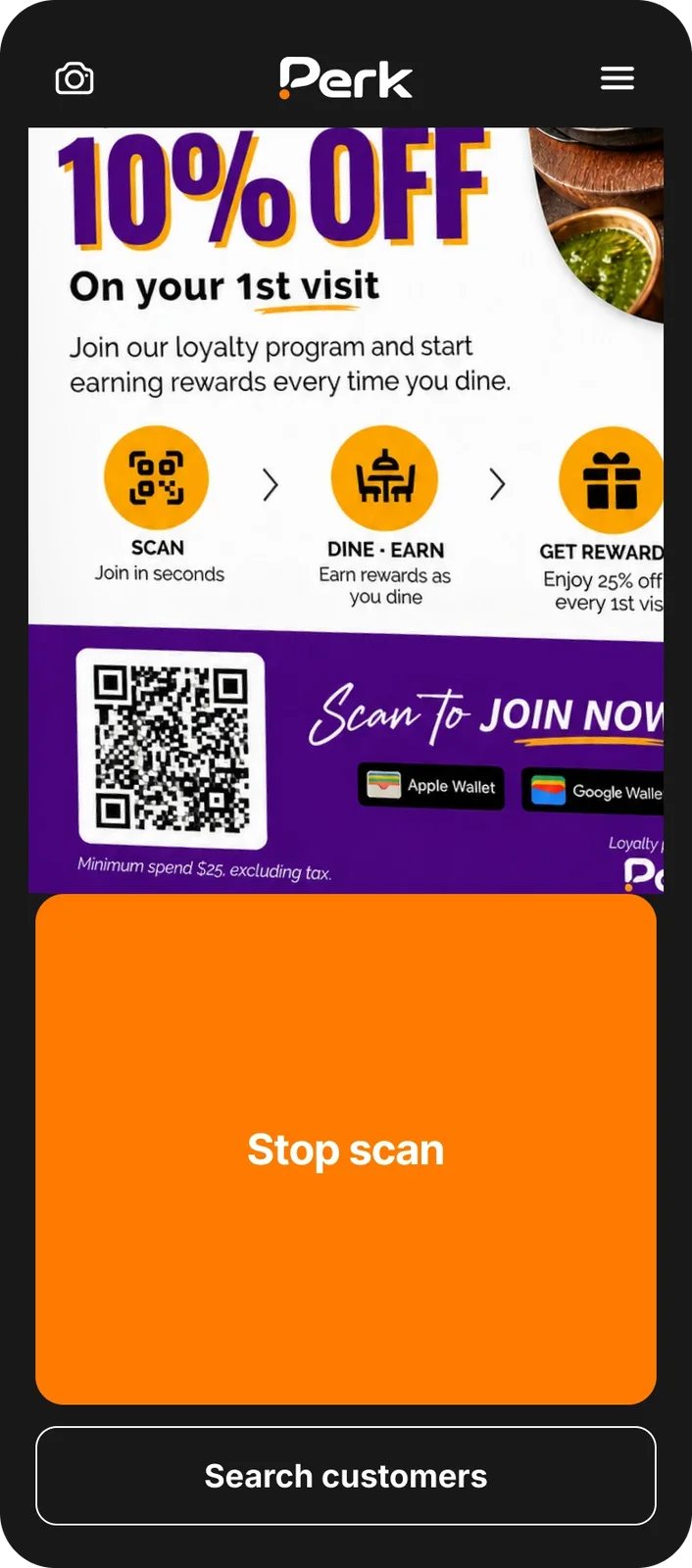
This matters more than it sounds. Owners often say a loyalty program lives or dies at the counter. If stamping takes a fiddly extra step, busy staff skip it and the program quietly fades. A single scan fits into the sale without slowing the morning rush.
Each team member can have their own login, so every stamp is tracked to a person and a time. That keeps things fair and makes mistakes easy to spot, which paper stamps never could.
Redeeming rewards works the same way
When a card is full, the same scanner redeems the reward. There’s no card to collect and no stamps to cross out, and the redemption is recorded in your dashboard alongside every visit.
Paper card vs loyalty app vs wallet card
Here’s how the three options compare for a small business.
| Paper punch card | Loyalty app | Wallet loyalty card | |
|---|---|---|---|
| Where it lives | A pocket, a wallet or a drawer | An app the customer has to download | Apple Wallet or Google Wallet |
| Effort to join | Take a card | Download, install and create an account | Scan a QR code and tap Add |
| Forgotten at home | Often | Rarely, if they kept the app | Rarely, because it’s on their phone |
| Reaching customers between visits | Not possible | App notifications, if they’re turned on | Messages on the lock screen |
| Knowing your regulars | No record of visits | Visits are recorded | Visits are recorded |
| At the counter | Stamp by hand | Depends on the setup | One scan with a phone |
A branded app can make sense for a large chain with online ordering and thousands of customers a day. For most independent businesses, it’s a lot to ask of a customer just to collect a free coffee. A wallet card gives you the parts that matter, a card they can’t lose and a way to reach them, without the download.
If you’re still on paper, our guide to replacing paper punch cards with a digital punch card covers the switch step by step.
How to get more customers to save your card
A wallet card removes the biggest barrier, but customers still need to know it exists. The businesses with the most sign-ups make the card part of every sale.
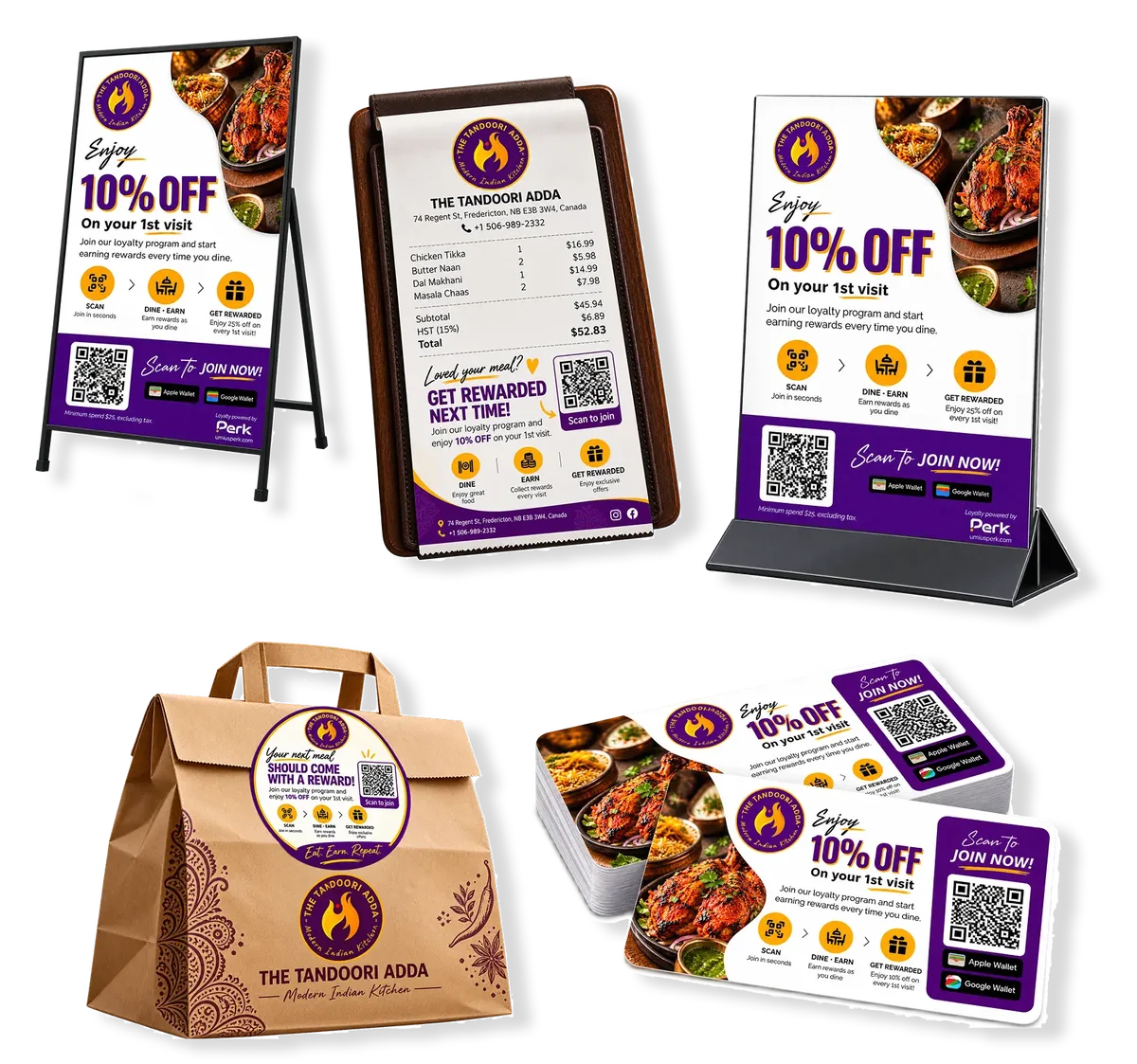
- Mention it at checkout, every time. One line is enough: “Want a free loyalty card? Just scan this, it takes two taps.”
- Put the QR code where people wait. On the counter, on tables, on receipts and on takeaway bags. Apple’s guidance says customer awareness and staff training make the biggest difference to how many people join.
- Give the first stamp straight away. A card that already has one stamp feels like progress, not a commitment.
- Make the reward worth it. A clear, appealing reward, said out loud at the till, does far more than a sign on the door.
- Remind them when they’re close. A message when they’re one stamp away gives a gentle reason to come back.
- Bring paper regulars across. If you’re replacing paper cards, add their existing stamps to the new card so nobody loses progress.
If you run a café, a stamp card for drinks is the easiest place to start. Our coffee shop loyalty program page shows a few ready-made setups, from a classic stamp card to prepaid coffee bundles.
Give customers a card they’ll actually save
Customers don’t avoid loyalty programs. They avoid effort, and an Apple Wallet loyalty card takes the effort out of joining.
Here’s what to take away:
- An Apple Wallet loyalty card saves to the phone in two taps, with no app to download.
- Offer Google Wallet too, because a big share of customers in Canada and the US use Android.
- Customers can check their progress any time, and you can reach them on the lock screen.
- Sign-ups depend on your team: mention the card, show the QR code and give the first stamp straight away.
Regulars are worth the effort. Square’s 2026 Local Economy Report found that regulars bring Canadian neighbourhood businesses nearly six times more annual revenue than one-time visitors. A card that’s easy to join gives more first-time visitors a reason to become one.
If you’d like to see your own card in Apple Wallet and Google Wallet, book a free demo. We’ll set up a sample card with your logo and show you how customers save it. There’s no obligation to sign up afterwards.
Frequently asked questions
Do customers need to download an app to use an Apple Wallet loyalty card?
No. Apple Wallet comes built into every iPhone, and Android customers save the same card to Google Wallet instead. Customers scan your QR code or tap a link, then tap Add to save the card.
Does an Apple Wallet loyalty card work on Android phones?
Apple Wallet is only on iPhones, but Android customers can save the same loyalty card to Google Wallet. With Perk, both versions come from one program, and your team scans them the same way at the counter.
How do customers add a loyalty card to Apple Wallet?
They scan your QR code with their iPhone camera or tap a link you’ve sent by text or email. A preview of your card appears, and one tap saves it to Apple Wallet. After that, the card is in the Wallet app whenever they need it.
Can I send messages to customers through their wallet card?
Yes. Wallet cards can show notifications on the lock screen when they update. With Perk, you can send a message to all cardholders, a group or a single customer. Keep messages occasional and useful so customers are glad to see them.
Do I need new equipment to scan wallet loyalty cards?
No. With Perk, your team scans cards with the Perk scanner, which runs in any phone’s browser, so there’s nothing to install. Each team member can have their own login, so every stamp is tracked to a person and a time.
Can I move my paper punch card customers to a wallet card?
Yes. When a regular saves their new card, add the stamps from their paper card so nobody loses progress. If you already have a customer list, Perk can import your existing customers with their balances and send them their new cards by text or email.